Running Scheduling, Inspections, and Defects
Use scheduling as the office control desk, inspections as execution review, and defects as the remediation queue.
Before you start
- The site record exists and the register is ready enough for live work, even if the exact system is not confirmed yet.
- Field resources and coordinators have access to the right workspace.
- You know whether follow-up will be inspection-only or commercial as well.
Expected outcome
The team can schedule work, review inspection return data, and move defects into the right remediation path without losing traceability.
The same lifecycle in words is: plan and deploy one inspection; let the field resource perform it; review the returned result, evidence, and visit notes; then preserve the completed evidence unchanged before releasing the output and triaging any defects. If no further action is needed, end the review. Otherwise, price the finding into a quote or leave Defects and create a manual call-out in Work Orders. There is no direct Defects-to-Work Orders action. Assign and schedule the approved remediation, complete it, and schedule another inspection only when follow-up is required and the completed Work Order is linked to a site with a system and industry.
Use Scheduler as the office control desk
- Keep planning work in Scheduler instead of spreading assignment state across calendar invites, notes, or chat.
- Review the Work queue, Draft work, Ready work, and Deployed work separately so engineers only inherit clean instructions.
- Use map and timeline views when location or route pressure matters more than a simple list.
- Keep office-only members out of live assignee lanes unless you intentionally enable field work for them.
Use target month when the month matters more than the day
- Choose
Target monthfor inspections or work orders that must happen in a specific month but do not yet have a real booked day. - Use this instead of putting a fake visit on the last day of the month.
- Expect month-planned rows to render as
Planned for Apr 2026rather than as a made-up date. - Keep month-planned work in draft planning state until the office picks a real slot.
- Once the team drags the job onto a day, bulk schedules it, or assigns a real visit date, the record should move back to
Exact date.
Schedule the visit before the exact system is known
- Create the inspection from the site even when the real installation has not been confirmed yet.
- Leave the inspection without a system when the building is new, partially commissioned, or only the field engineer can verify what is actually installed.
- Treat
System pendingas a valid planning state, not as a blocker. - Remember that the inspection still ends up bound to one real system. This workflow only delays that binding until the visit.
- Use this path for uncertainty, not for mixed-scope work. If two different systems need inspection, create two inspections.
Review inspections as execution returns
- Open the inspection workspace when field records begin to come back.
- If the row shows
System pending, the visit can still be underway, but checklist, asset, certificate, and sign-off actions stay locked until the engineer binds the real system. - Check visit notes, checklist results, and defect detail together before deciding whether the job is complete.
- Use the planned-date filters when you need to review upcoming planned work by scheduling intent; keep the older date filters for historical or completion-oriented review.
- Use the visit-note history to understand what changed during the visit instead of relying only on the latest certificate.
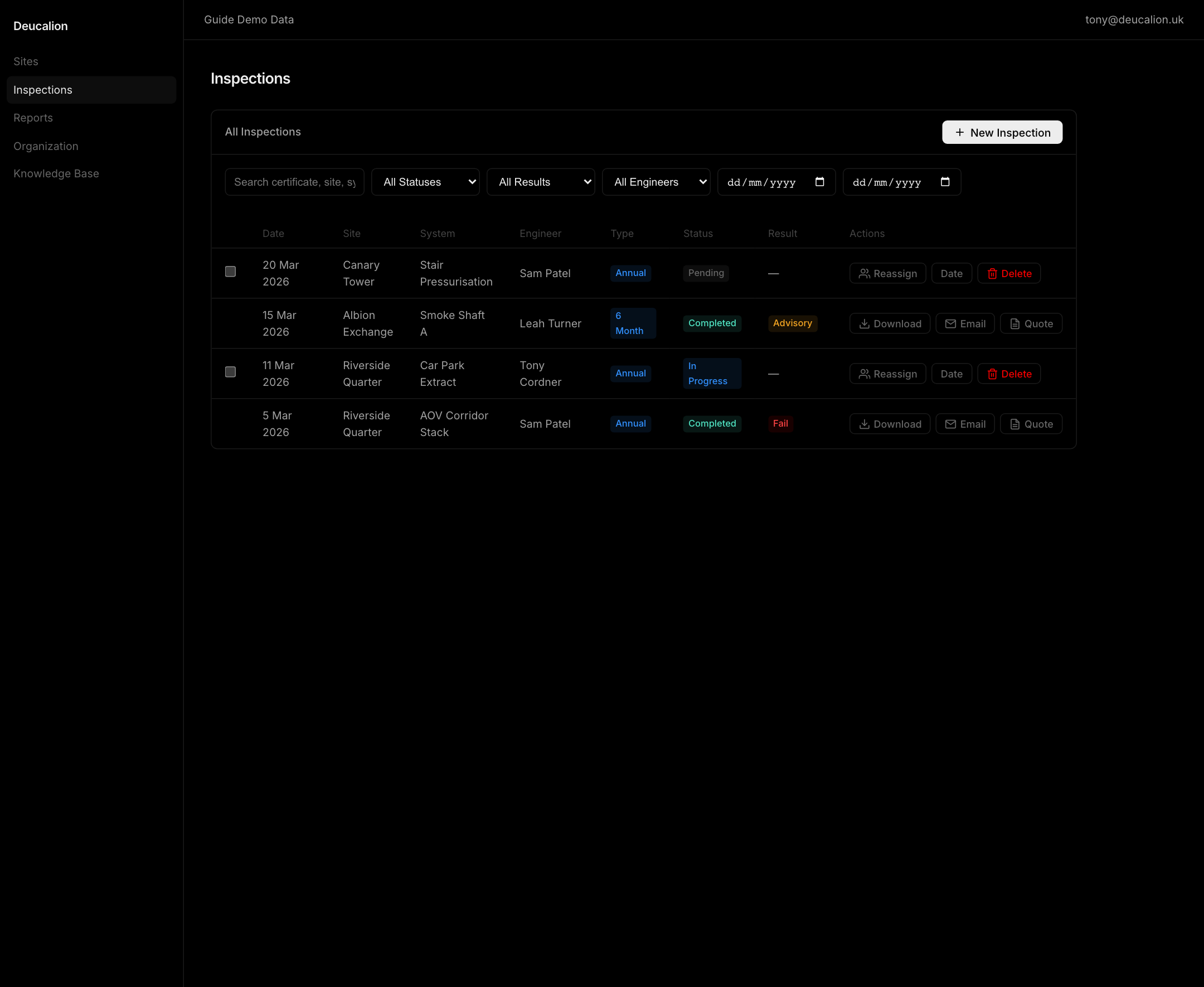
- Treat
Pending,Active, andDoneas the visible inspection states. Planning and deletion actions belong to unfinished records; report, certificate, and quote actions belong to completed records.
Treat defects as a queue, not just evidence
- Review defects by severity, age, and commercial significance.
- Confirm photos, annotations, and visit notes explain the problem clearly enough for review outside the site.
- Decide whether the finding needs no further action, should become a quote, or needs a separate work order. Once the source inspection is completed, keep its defect evidence unchanged.
- Create one quote from a defect or a same-site selection. Mixed-site selections need separate quote drafts.
- Do not edit or delete a defect after its source inspection is completed. The completed inspection is the evidence boundary, but read-only review and quote creation remain available.
- If another editor changes an unfinished defect, keep your draft open, reload the latest record, review overlapping fields, then retry the changes you still intend to keep.
Run remediation through Work Orders
- Use
Pending,In Progress,On Hold,Completed, andCancelledas distinct work-order states. - Record a reason when putting work on hold. Resume to the previous pre-start or active state instead of skipping the state machine.
- Delete only a pending work order. Cancel active or held work so its office and field history remains intact.
- Treat contractor evidence and proposed updates as staged. An organization or platform admin must approve and merge a submitted update before it changes the official work order.
- From a completed, site-linked work order, schedule a follow-up inspection only when the remediation needs another field check.
Use feature availability notes correctly
- If quote, work-order, analytics, or AI-assisted actions do not appear, check feature availability before escalating it as a workflow failure.
- Keep the operational state current even when a downstream commercial desk is not enabled in that workspace.
Troubleshooting
| Problem | What to check |
|---|---|
| A field resource cannot see the job you just created | Confirm it is deployed, linked to the right site, and assigned to a member with field work enabled. |
| A scheduler says they need the work in April but do not know the day yet | Use Target month instead of a fake month-end booking. The job should stay in draft planning state until a real visit date is chosen. |
The inspection row shows System pending and the office thinks it failed to create | Check whether the visit was intentionally scheduled before the live system was known. The engineer must bind the real system during the visit before completion or certificate actions unlock. |
| A planned inspection does not show up under the expected future filter | Check whether you are using the planned-date filters rather than the older inspection history date filters. |
| The inspection looks complete but the output still feels risky | Re-check visit notes, evidence, and defect clarity before releasing the report. |
| Defects are piling up with no follow-up | Decide whether each finding needs no further action, a quote, or a separate work order. Preserve defects from completed inspections unchanged. |
| A completed inspection defect cannot be edited | This is intentional. Preserve the completed evidence and use a quote or work order for follow-up. |
| A work-order change reports that the record changed | Review the reloaded detail, then reopen the assignment, schedule, CRM, hold, or cancellation editor and reapply the intended change. |
| Contractor evidence is visible but the work order has not changed | Check the admin-only Submissions queue. The staged update changes the official record only after approval and merge. |
Related guides
- Use Scheduler Quickstart for planning, assignment, and deployment.
- Use Running Inspections for field execution and evidence capture.
Managing Sites, Systems, and Assets
Build a clean estate register that gives engineers the right site, system, and asset context before they leave the office.
Running the Scheduler Day to Day
Run the Scheduler Dispatch Desk with work-queue control, quick-view drawer edits, named actions, and the right planner surface for each decision.